今天我在把QMT的策略迁移到ptrade,发现2个系统的差别还是很大的,今天就简单的分享一下经验,对比一下框架函数,怎么样快速把QMt策略迁移到ptrade,ptrade实盘代码和回测的代码有的函数使用还是有区别的,不注意就会触发未来函数,
大QMt的写法,比较复杂,对比下来ptrade稍微简单一点
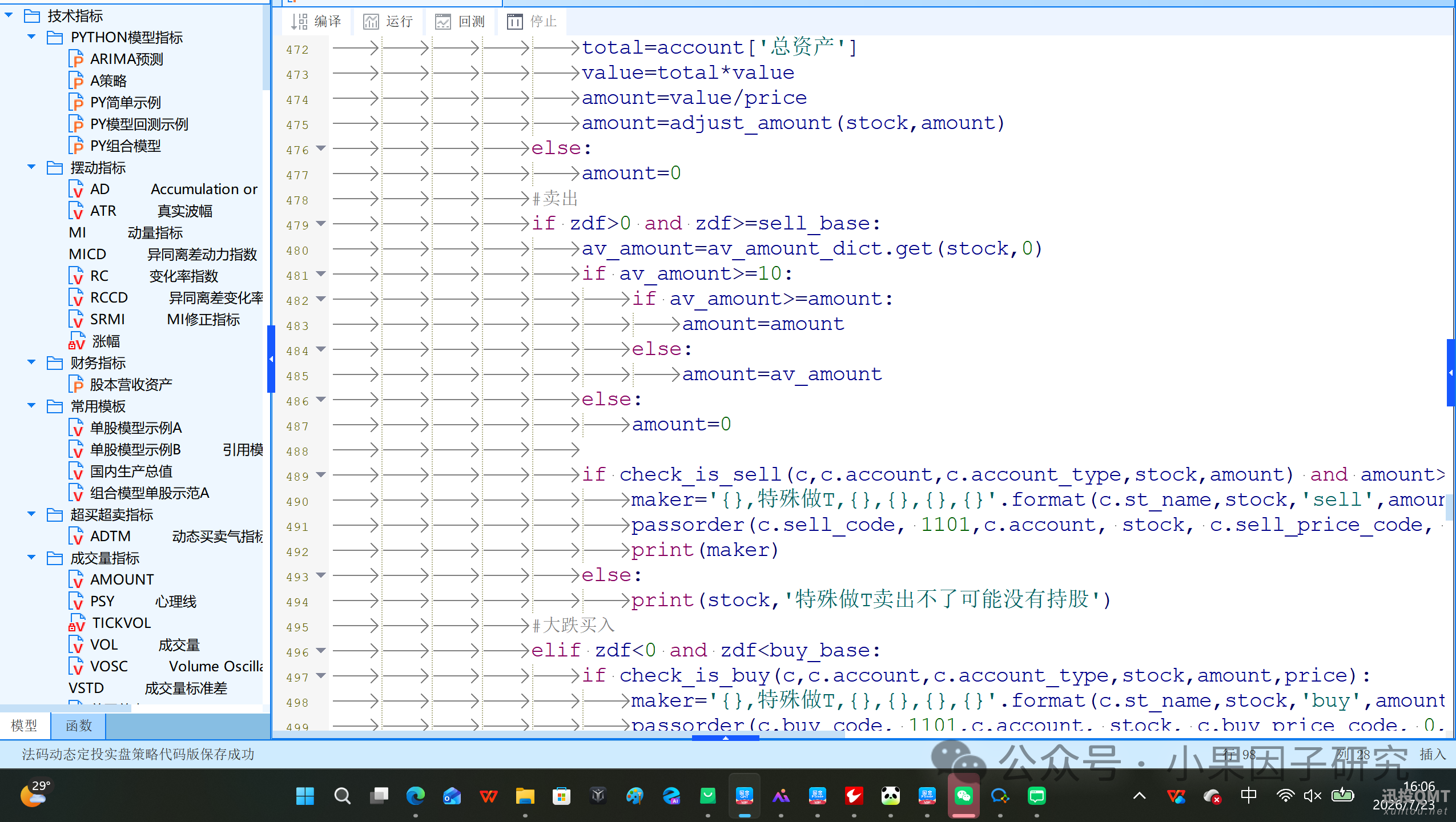
ptrade实盘的写法
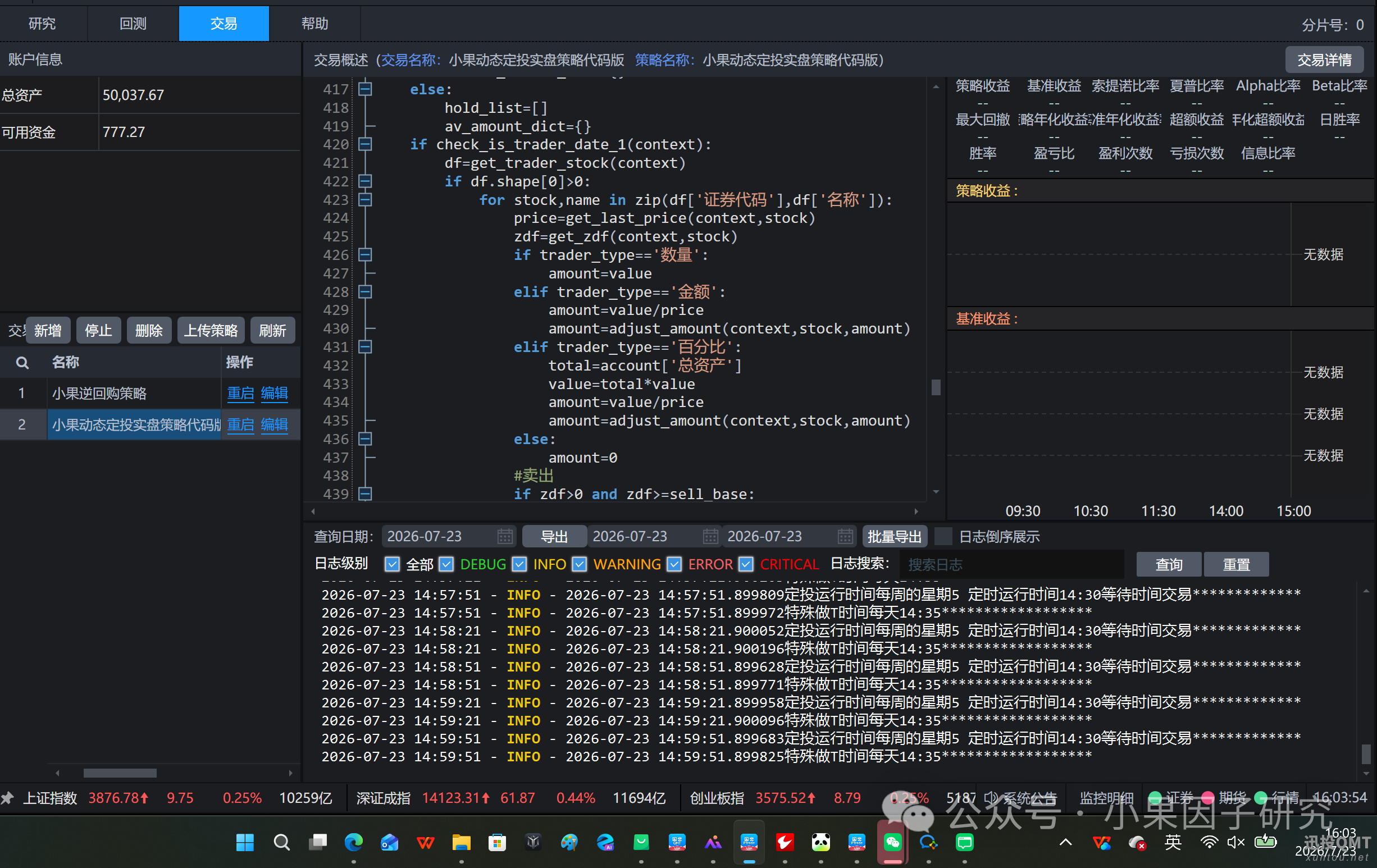
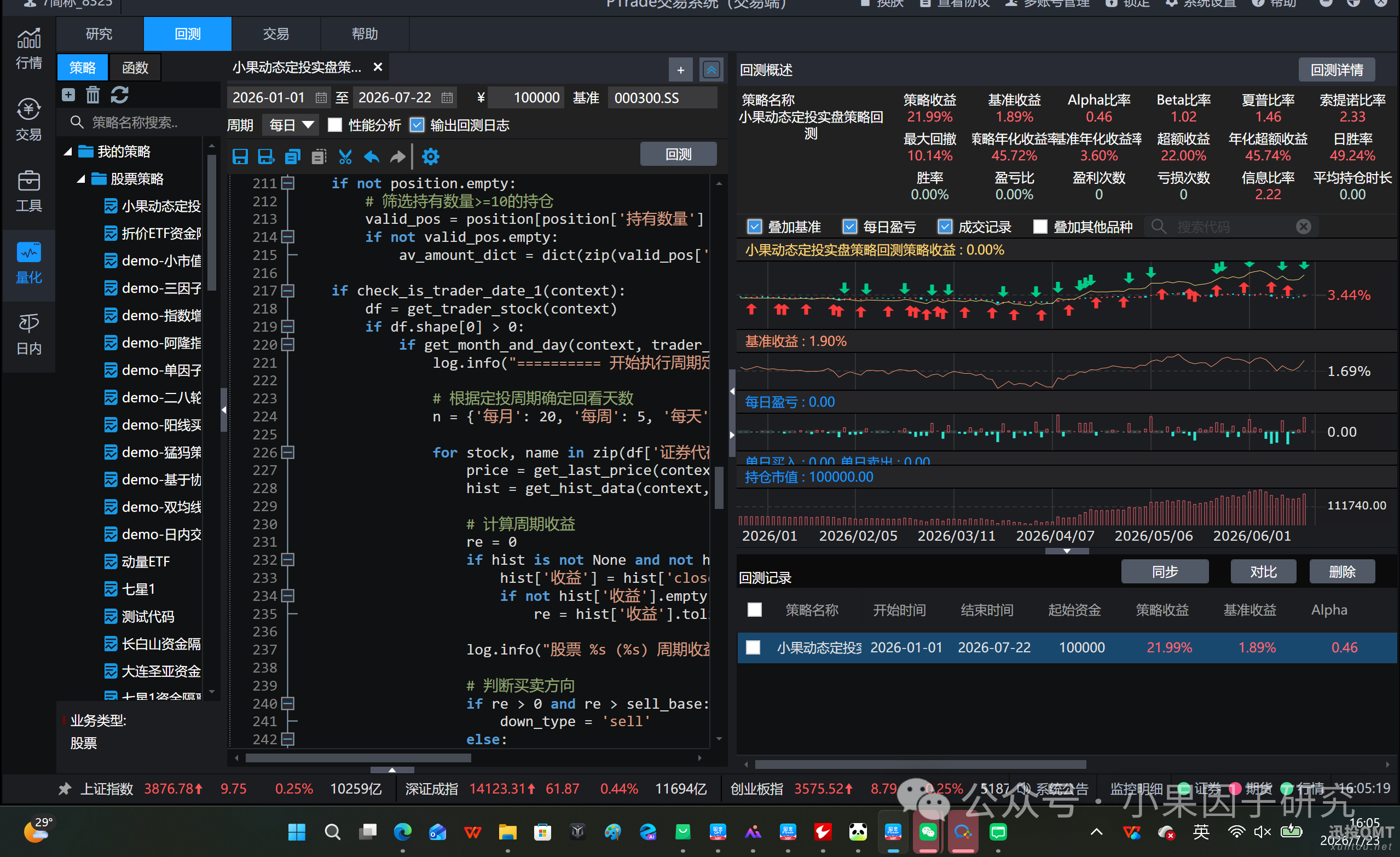
回测的ptrade写法,还是有很大的差别
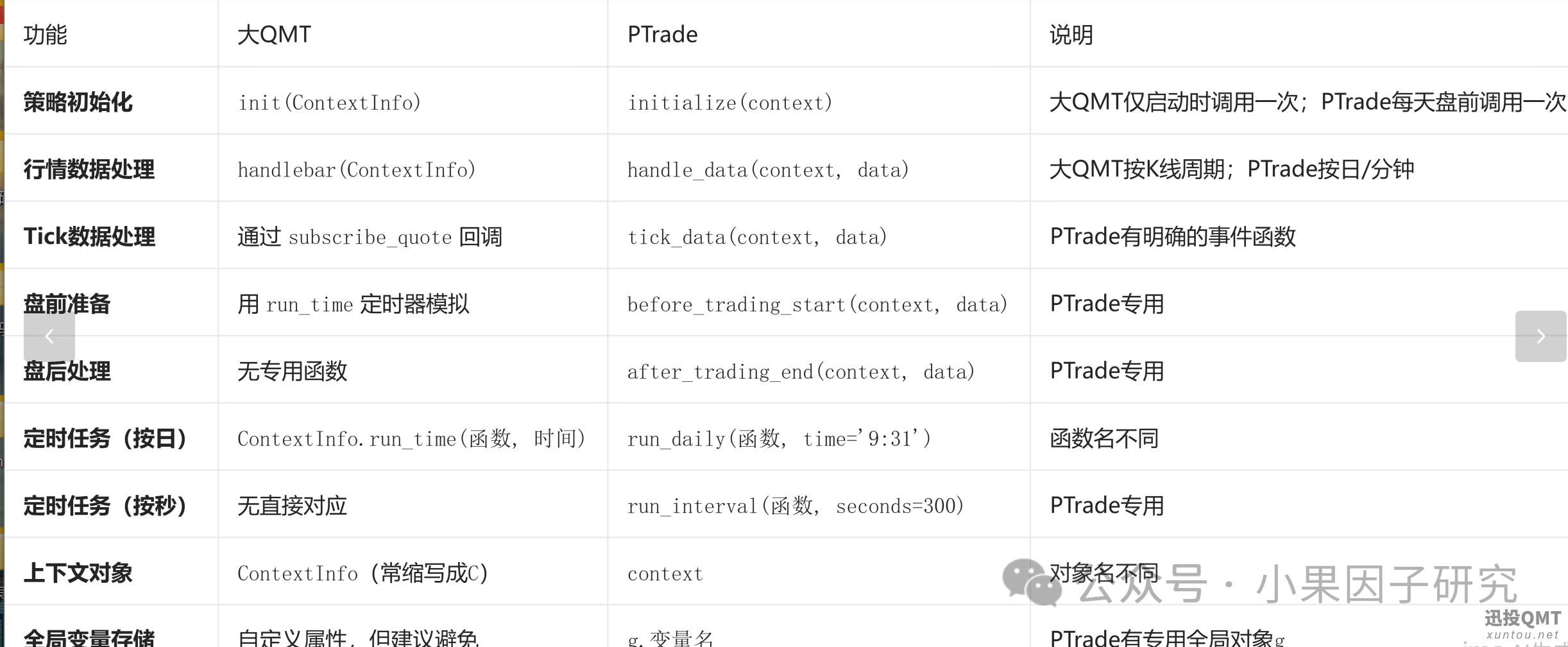
下面是简单的对比qmt和ptrade系统的差别,方便快速迁移策略
一、策略框架与事件函数
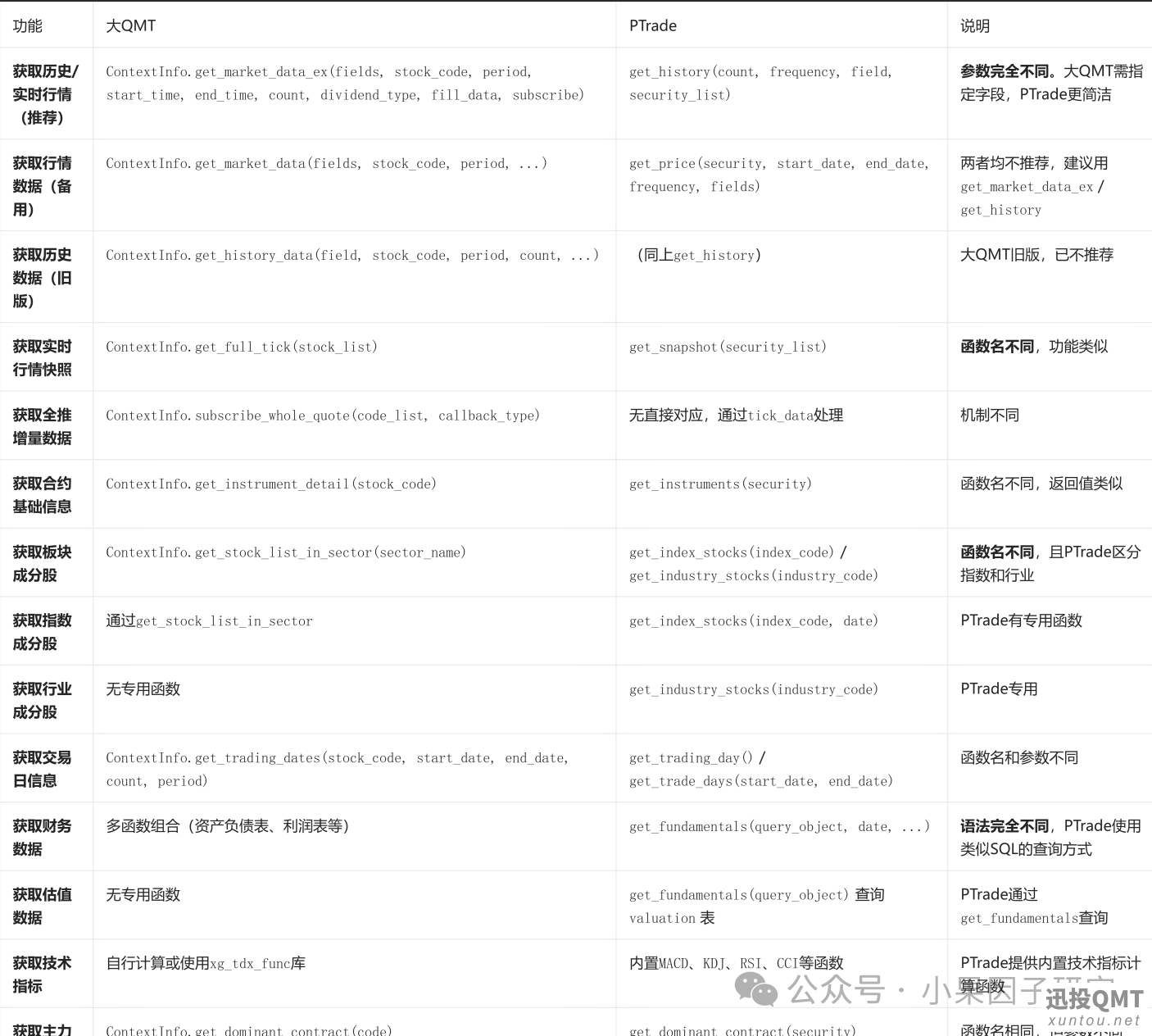
二、行情数据获取函数
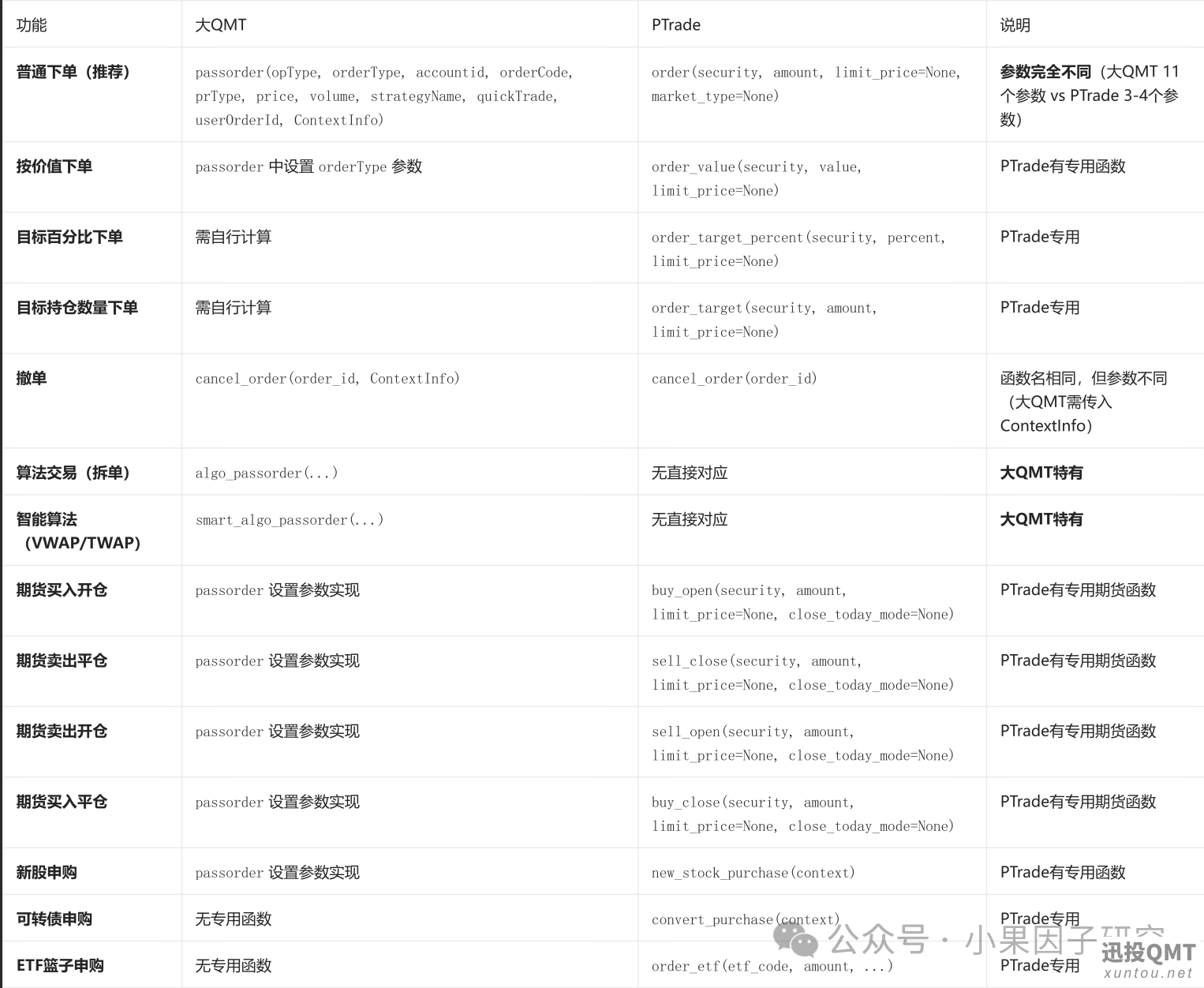
三、交易下单函数
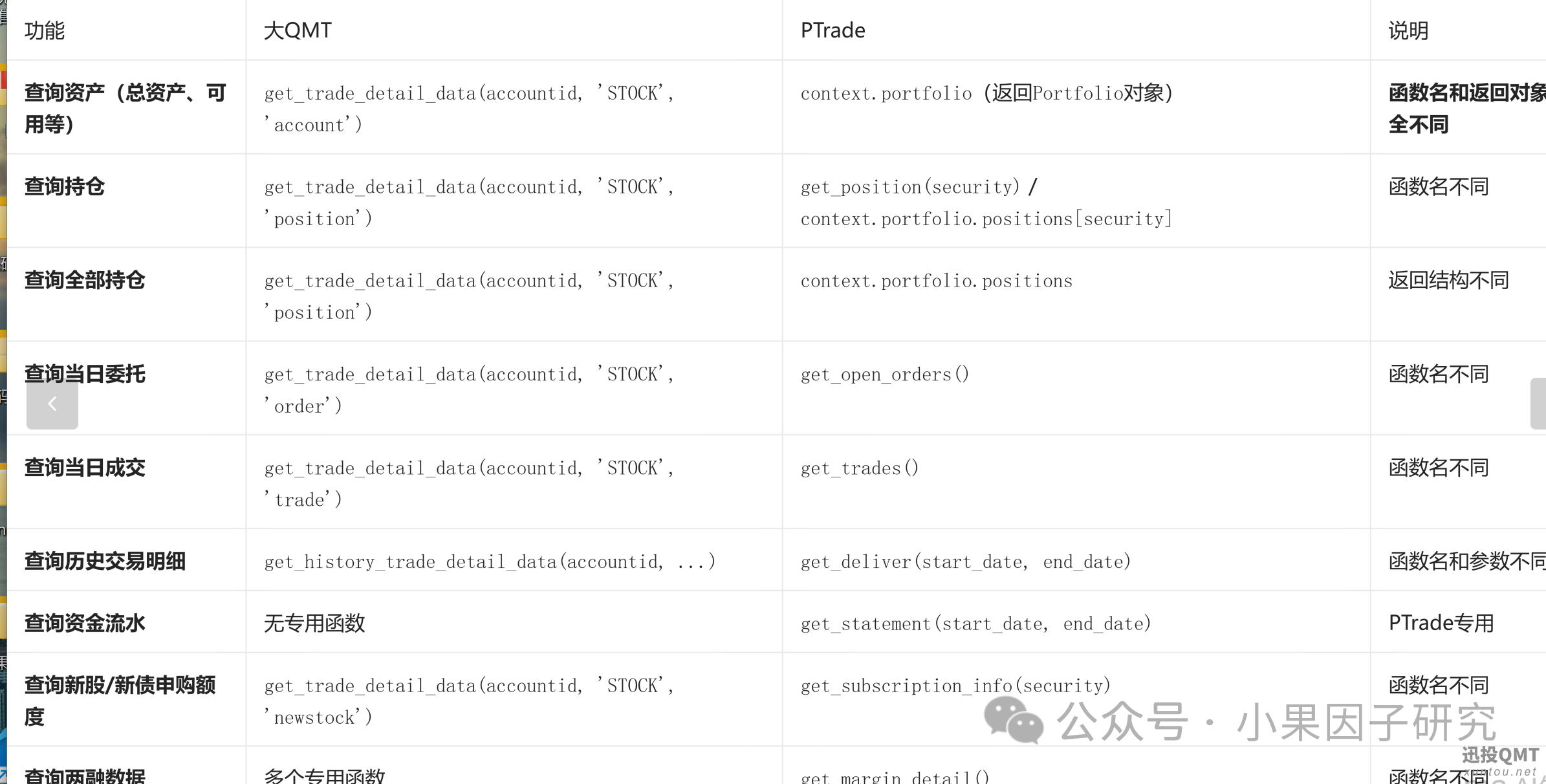
四、账户与交易查询函数
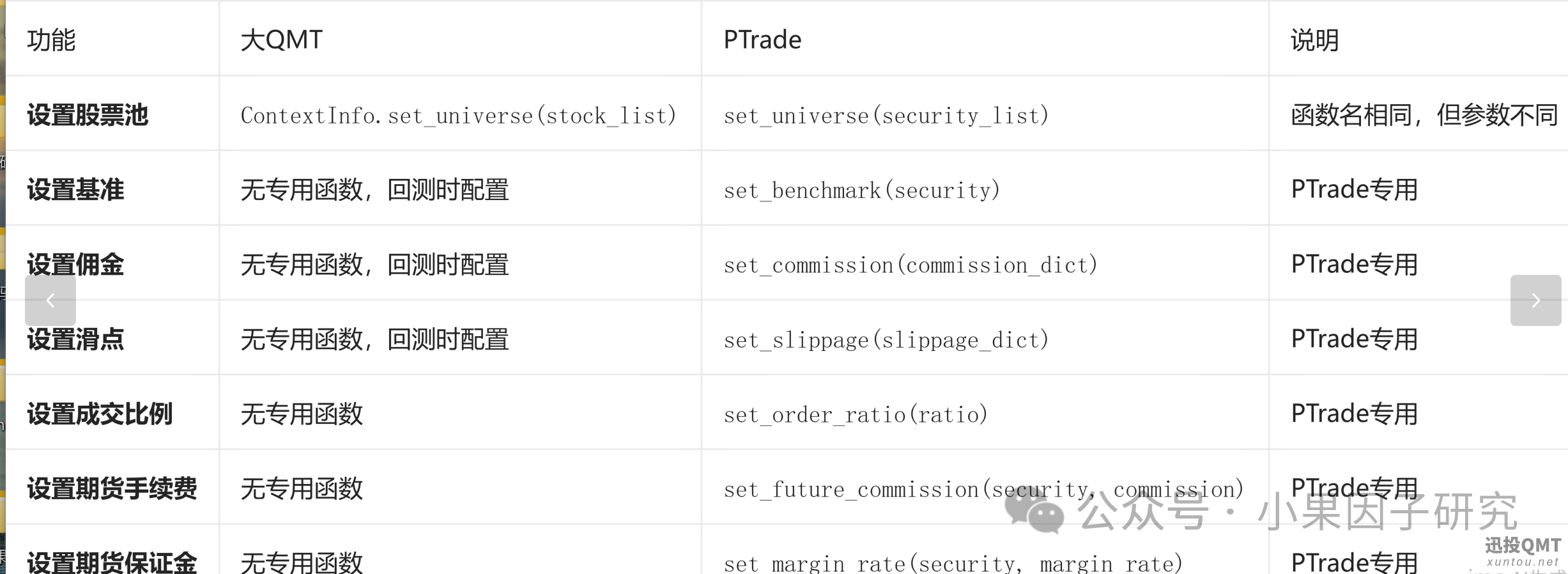
五、设置与配置函数
六、辅助与信息函数
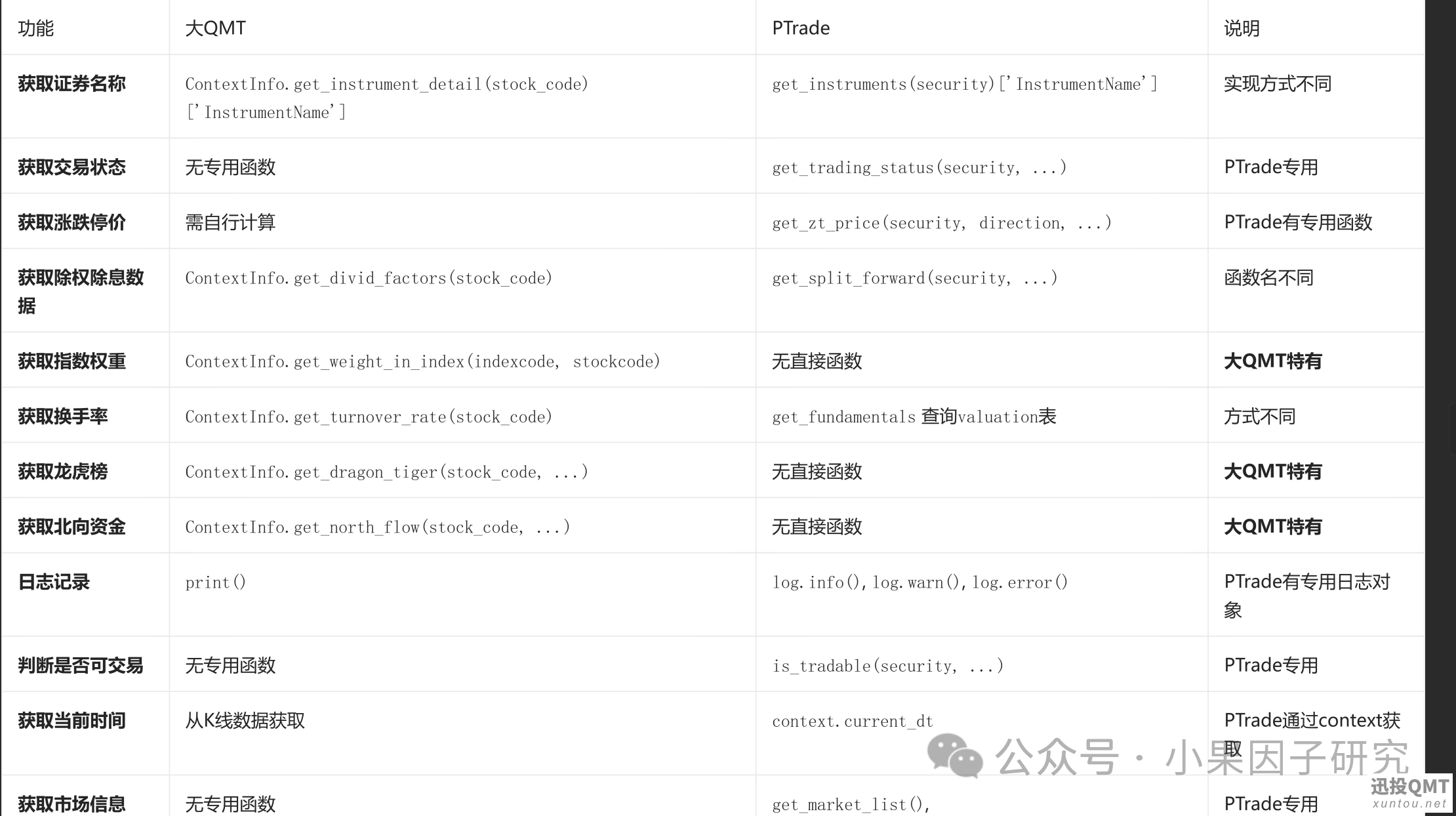
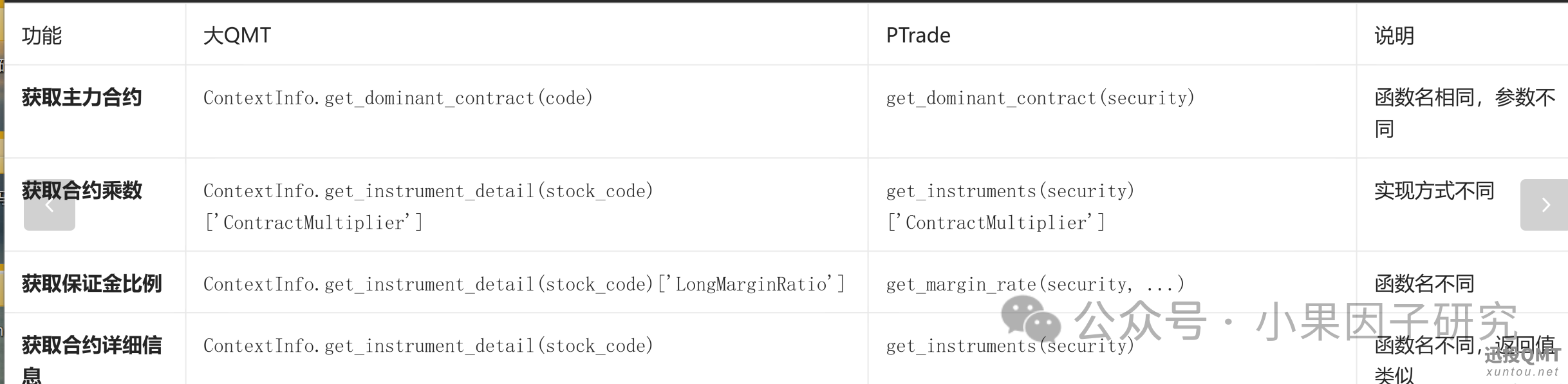
七、期货专用函数
八、核心差异总结(迁移必看)
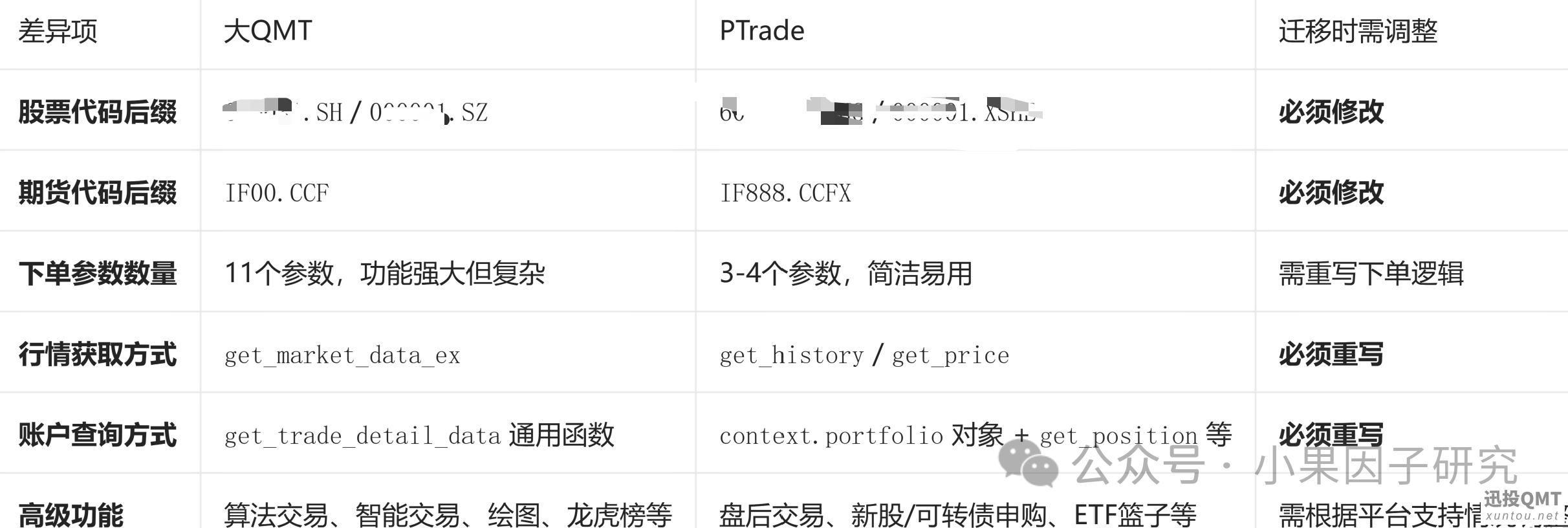
快速迁移的核心口诀:
框架先改:init → initialize,handlebar → run_daily
后缀全换:.SZ → .SZ,.SH → .SS
行情重写:get_market_data_ex → get_history
下单简化:passorder(11个参数) → order(3个参数)
查询改名:get_holdings → get_position,get_trade_detail_data → context.portfolio
日志替换:print → log.info
特有功能处理:算法交易、绘图等大QMT特有功能,在PTrade中需自行实现或放弃
不懂的问我就可以,专业的量化技术支持,加我备注入群可以加入量化研究群

下面是官方简单的例子,方便怎么样去迁移对比区别参考,qmt例子
#coding:gbk
'''
大QMT 最简单双均线策略(使用run_time定时器优化版)
'''
def init(C):
    C.fast = ''      # 快线周期
    C.slow = ''     # 慢线周期
    C.stock = '1.SZ'  # 标的代码(带后缀)
    C.accountid = '55009640'  # 资金账号
    # 设置定时器:每天14:55:00运行一次 main_logic 函数
    # 格式:'55nSecond' 表示每55秒运行一次,这里用 '1nDay' 表示每天运行一次
    # startTime 设为 '2024-01-01 14:55:00' 表示第一次在14:55触发
    C.run_time("main_logic", "1nDay", "2024-01-01 14:55:00")
    print("定时器已设置,将在每天14:55运行策略")
# 这个是定时器回调函数,入参是 ContextInfo 对象
def main_logic(C):
    # 获取收盘价数据
    df = C.get_market_data_ex(
        ['close'],
        [C.stock],
        period='1d',
        count=C.slow + 5,
        subscribe=False
    )
    close_list = list(df[C.stock].iloc[:, 0])
    if len(close_list) < C.slow + 1:
        return
    # 计算均线
    fast_ma = sum(close_list[-C.fast:]) / C.fast
    slow_ma = sum(close_list[-C.slow:]) / C.slow
    prev_fast_ma = sum(close_list[-C.fast-1:-1]) / C.fast
    prev_slow_ma = sum(close_list[-C.slow-1:-1]) / C.slow
    # 查询持仓
    positions = get_holdings(C.accountid, 'STOCK')
    vol = 0
    if C.stock in positions:
        vol = positions[C.stock]['CurrentAmount']
    # 交易逻辑
    # 金叉买入
    if prev_fast_ma <= prev_slow_ma and fast_ma > slow_ma:
        if vol == 0:
            passorder(23, 1101, C.accountid, C.stock, 5, -1, 100, 'SimpleMA', 2, '', C)
            print(f'{C.stock} 金叉买入100股')
    # 死叉卖出
    elif prev_fast_ma >= prev_slow_ma and fast_ma < slow_ma:
        if vol > 0:
            passorder(24, 1101, C.accountid, C.stock, 5, -1, vol, 'SimpleMA', 2, '', C)
            print(f'{C.stock} 死叉卖出{vol}股')
ptrade简单例子
'''
PTrade 最简单双均线策略(修正版)
'''
# 初始化函数
def initialize(context):
    context.fast = ''          # 快线周期
    context.slow = ''         # 慢线周期
    context.stock = '0000.SZ'  # 标的代码

    run_daily(context, main_logic, time='14:55')
# 自定义策略函数(注意:此函数必须接受 context 作为参数)
def main_logic(context):
    # 获取历史收盘价
    df = get_history(context.slow + 5, '1d', 'close', [context.stock])
    if df is None or len(df) < context.slow + 1:
        return
    close_list = df[context.stock].values
    # 计算均线
    fast_ma = sum(close_list[-context.fast:]) / context.fast
    slow_ma = sum(close_list[-context.slow:]) / context.slow
    prev_fast_ma = sum(close_list[-context.fast-1:-1]) / context.fast
    prev_slow_ma = sum(close_list[-context.slow-1:-1]) / context.slow
    # 查询持仓
    position = get_position(context.stock)
    vol = 0 if position is None else position.total_amount
    # 交易逻辑
    # 金叉买入
    if prev_fast_ma <= prev_slow_ma and fast_ma > slow_ma:
        if vol == 0:
            order(context.stock, 100)
            log.info(f'{context.stock} 金叉买入100股')
    # 死叉卖出
    elif prev_fast_ma >= prev_slow_ma and fast_ma < slow_ma:
        if vol > 0:
            order(context.stock, -vol)
            log.info(f'{context.stock} 死叉卖出{vol}股')
 【攻略】可视化编辑器(0代码策略交易)使61011 人气#QMT投研数据服务
 过期期权数据下载38 人气#有问必答
 《QMT量化实战系列》复现聚宽年化30%+的ETF3487 人气#QMT投研数据服务
 【python分享6】如何使用order_callback等10750 人气#QMT投研数据服务